Step-by-Step Guide to Creating a Shopify Development Store in 2026

If you’re planning to build Shopify apps, themes, or client stores, creating a Shopify dev store is the first step. A development store gives you a safe environment to experiment, design, and mailbuild production-ready ecommerce experiences without paying monthly fees.
And the timing couldn’t be better. Shopify continues to dominate the ecommerce ecosystem globally. According to Statista, global ecommerce is projected to reach nearly $7.4 trillion by 2026, highlighting the explosive growth of online retail. Meanwhile, Shopify remains one of the most influential platforms in the industry — powering millions of active stores worldwide and capturing roughly 30% of ecommerce businesses in key markets like the U.S.
From startups launching their first product to agencies scaling global brands, Shopify’s ecosystem is expanding rapidly — and development stores are at the center of it all.
In this 2026 guide, we’ll walk you through everything — from setup to best practices — so you can launch your first Shopify dev shop like a pro.
TL;DR
- Shopify dev stores are free testing environments for developers.
- Create one using a Shopify Partner account dashboard.
- Ideal for building, testing, and transferring client stores.
- Safe environment without impacting live store performance.
- Upgrade or transfer store to enable real sales.
Key Points
- Shopify dev stores offer a free and flexible environment to build and test ecommerce stores without the risk of live customers or transactions.
- Using the Shopify Partner Dashboard, you can create unlimited development stores for experiments, prototypes, or even complete client builds
- Choosing the right store purpose during setup ensures smooth transfers and avoids limitations later in development.
- Dev stores allow safe testing of themes, apps, payments, and integrations before launching stores publicly.
- Once ready, development stores can be transferred to clients and converted into live Shopify stores.
What Is a Shopify Development Store?
Shopify stores are free, functional spaces for testing and developing a store before launching. As a Shopify merchant, you can use these stores to test out your store without paying subscription fees or risking any real customer experiences until you’re ready to launch them live.
These Shopify development stores can be thought of as your “backstage” area to experiment and create your ecommerce business. Rather than creating and experimenting on a “live” store, you can use the development store to create layouts, test new features, and create a complete ecommerce shop with complete freedom.
With a Shopify dev store, you can:
- Build and prototype ecommerce stores without financial risk
- Test themes, apps, and custom functionality
- Develop client-ready Shopify websites from scratch
- Explore new features before launching publicly
What makes development stores powerful is that they offer access to advanced Shopify capabilities similar to higher-tier plans. This means you can build production-level stores during development. However, these stores are meant strictly for testing and building — real sales only begin once the store is transferred to a client or upgraded to a paid plan.
In short, a Shopify development store lets you build smarter, test safer, and launch with confidence.
Why You Need a Shopify Dev Store in 2026
By 2026, ecommerce will be changing at a breakneck speed. Shopify keeps releasing different features, app updates, AI tools, and checkout enhancements. It is dangerous to test a live store directly, as one tiny error may lead to loss of sales, bad user experience, or loss of client trust. That’s exactly why a Shopify dev store is essential.
A Shopify dev shop gives you a safe, controlled environment to build, test, and refine before anything goes public.
Creating a development store is especially important if you are:
- Shopify developers and agencies managing multiple client projects
- Freelancers building custom stores for businesses
- Theme and app creators testing performance and compatibility
- Ecommerce consultants optimizing stores before launch
In essence, a Shopify dev store allows you to be more efficient, produce higher quality work, and keep real businesses safe while you work.
You do not have to test changes on your revenue, generating website. You can try out updates, custom code, design changes, and new integrations in a dev store first. This way, you lower the risk, improve the quality, and have a more seamless launch.
Why You Need a Shopify Dev Store in 2026
As ecommerce grows exponentially over the next five years (2026), the margins for error are decreasing. Shopify is innovating rapidly by introducing new AI capabilities, improvements to the checkout process, enhancements to performance, and changes in their app ecosystem. Testing live store changes directly through an existing store is no longer a reliable method of making adjustments. Even small missteps can negatively affect your sales, your customer’s level of trust in you as a retailer, and your revenue source.
That’s where a Shopify dev store becomes essential.
A Shopify dev shop gives you a secure development environment where you can build, experiment, and refine without putting real businesses at risk. It allows you to validate ideas, test integrations, and perfect store experiences before going live.
A development store is especially valuable if you are:
- Shopify developers or agencies managing multiple builds
- Freelancers creating stores for clients
- Theme or app developers testing compatibility and performance
- Ecommerce consultants optimizing stores before launch
Rather than continuously rushing untested updates to production, why not securely evaluate your design changes, custom code, new apps, and feature rollouts in a controlled environment? Not only will this lead to better build quality, but it will also make for smoother launches and more satisfied clients.
Given the rapid pace of change in the ecommerce world, having a Shopify development store is more than just a handy tool; it is a clever, expert move that allows you to build with certainty.
Step-by-Step: How to Create a Shopify Dev Store
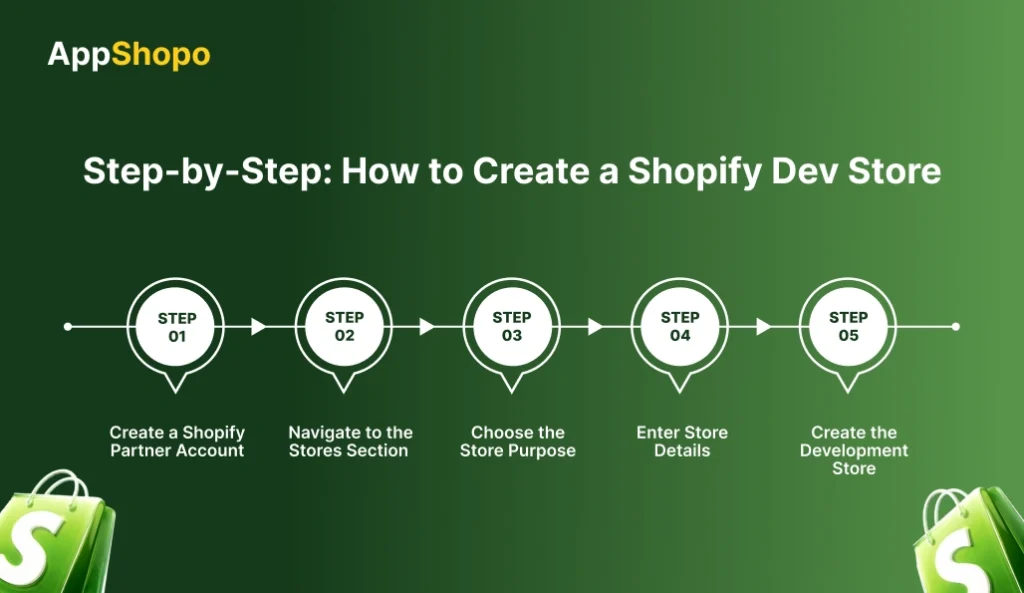
In 2026, setting up a developer store on Shopify is pretty straightforward; however, getting a clear understanding of each step will help you do things properly, especially if you intend to hand the store over to the clients later.
Here is a complete step-by-step guide for creating your Shopify dev store correctly.
Step 1: Create a Shopify Partner Account
If you don’t have a Shopify Partner account, you won’t be able to create development stores.
First, go to the Shopify Partner page and register for a free account. The program is intended for developers, agencies, freelancers, and technology partners who create on Shopify.
Once approved, you’ll gain access to:
- Unlimited development stores
- The Partner Dashboard for managing projects
- Shopify developer tools and resources
After registration, log in to your Partner Dashboard, which will act as your main control panel for creating and managing dev stores.
Step 2: Navigate to the Stores Section
The Partners Dashboard has a Store Management section that enables you to manage all of your Shopify development stores from one location, whether that’s creating new development stores as well as accessing and managing currently active development stores or organizing multiple projects. This is your central hub for building, editing, and analyzing the development store created within the Shopify platform.
Here’s how to proceed:
- Click on Stores in the left menu
- Select Add store
- Choose Create development store
This action launches Shopify’s development store setup wizard, where you’ll configure your new store.
Step 3: Choose the Store Purpose
Selecting the appropriate purpose during setup is among the most critical decisions you will make as it will ultimately have a lack of impact on how you utilize the store once fully setup. Factors such as transferability, permissions, and flexibility down the road are valuable considerations when making your choice for an intended purpose based on your overall strategy.
Shopify will ask how you plan to use the development store.
Option 1: Build and Test Store
Choose this if you want to:
- Test apps or themes
- Experiment with features
- Build personal projects
However, these stores may have transfer limitations depending on how they’re used.
Option 2: Client Store
Choose this if you’re:
- Building a store for a client
- Planning to transfer ownership later
- Running an agency or freelance business
This option is optimized for smooth handover once development is complete.
Pro Tip: If there’s any chance the store will be transferred, always choose the client store option.
Step 4: Enter Store Details
During this phase, you will establish the focused identity for your store by setting its name, region, and initial setup data. All of these elements are key parts of how your store will be built and how users will find you, so it is essential to enter accurate data that supports your project goals and the way you intend to use it in the future.
You’ll be asked to fill in:
- Store Name – This generates the permanent .myshopify.com URL
- Country or Region – Helps configure taxes, payments, and defaults
- Store Data – Choose between a blank store or pre-filled test data
If you’re building for clients, it’s usually best to start with a blank store for a clean setup.
Important: The myshopify domain created here cannot be changed later, so choose the store name carefully.
Step 5: Create the Development Store
Once you have completed the last step and filled in all the required fields, you can create your new development store by clicking on the “Create development store” button. This will initiate the creation of your new development store and the system will create the necessary files that will be part of your new store’s environment. Please double, check all your information before proceeding, certain settings, such as the URL for your new store, will not be changeable after the development store has been created!
Shopify will create your development store immediately upon completion and redirect you to your admin dashboard. Once you are on the dashboard, you may begin updating theme, adding apps and configuring settings. The admin dashboard will be your control centre for building, testing and managing your store from one single place.
From here, you can:
- Install themes and apps
- Customize design and layouts
- Configure settings and integrations
- Begin development work
Your new Shopify dev shop will always be accessible from the Partner Dashboard, where you can manage multiple development stores easily.
What You Can Do With a Shopify Dev Shop
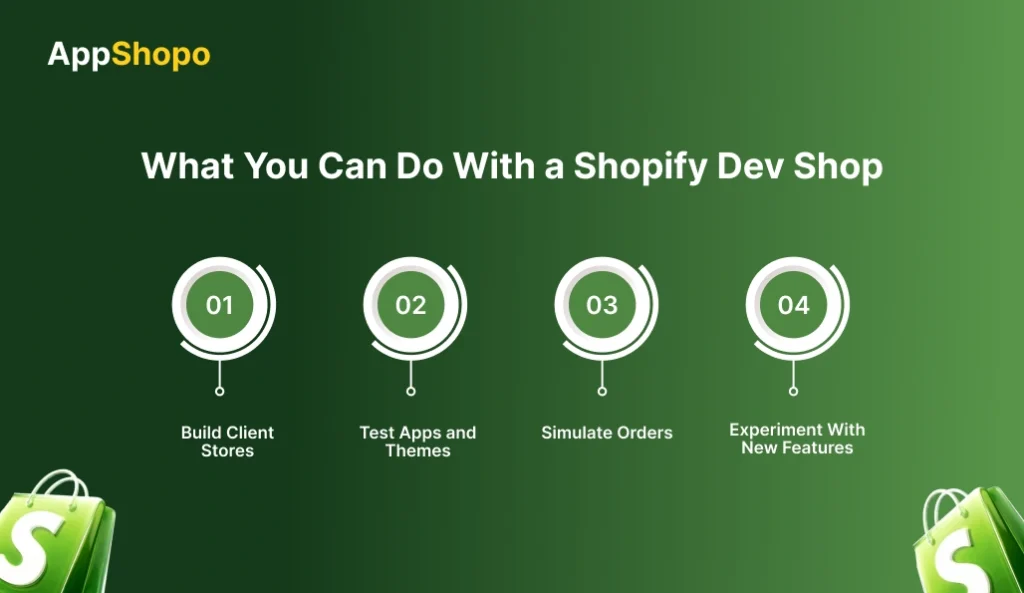
Once your Shopify dev shop is set up, you can start building and experimenting right away. Development stores are designed to give you complete flexibility, allowing you to create, test, and refine ecommerce experiences without affecting live customers or real revenue.
Here are the key things you can do with a Shopify development store:
1. Build Client Stores
You can create fully functional ecommerce stores for clients from scratch. Design layouts, configure products, install apps, and optimize user experience — then transfer the store once it’s ready to go live.
2. Test Apps and Themes
Development stores are perfect for testing custom themes and third-party apps. You can safely evaluate performance, compatibility, and functionality without risking a live store environment.
3. Simulate Orders
Shopify allows you to use test payment gateways, so you can simulate real transactions without actual payments. This helps you validate checkout flows, order processing, and customer journeys.
4. Experiment With New Features
You can explore developer previews, beta features, and upcoming Shopify updates before public release. This gives you a competitive edge and helps you stay ahead of platform changes.
In short, a Shopify dev shop gives you the freedom to build, test, and innovate — all in a safe, controlled environment.
Shopify Dev Store vs Live Store
Development stores and live stores are different in terms of their purposes within the Shopify ecosystem. A Shopify dev store is basically a test platform where you can do building and experimentation while a live store is a store for real customers and transactions. Knowing the differences between the two will help you select an appropriate environment for developing, testing, and launching e-commerce experiences in a safe manner.
| Feature | Dev Store | Live Store |
| Cost | Free | Monthly plan |
| Testing | Unlimited | Limited |
| Real Payments | No | Yes |
| Transferable | Yes (client builds) | No |
| Risk | Zero | Higher (real users involved) |
Best Practices for Shopify Development Stores
To get the most value from your Shopify dev shop, it’s important to follow a few proven best practices. These tips will help you stay organized, avoid common mistakes, and ensure smoother client handoffs and launches.
1. Use Clear Naming Conventions
Always use structured and descriptive store names so you can easily identify projects later, especially when managing multiple development stores. A clear naming format helps you quickly understand the store’s purpose, client, or stage without opening it. This becomes essential for agencies, freelancers, and developers handling several builds simultaneously.
- clientname-dev
- brandname-staging
- theme-test-v2
Clear naming helps you manage multiple development stores without confusion, especially if you’re an agency handling multiple clients.
2. Avoid Test Data for Client Builds
While Shopify allows you to generate sample products and data, it’s best to avoid using test data for client stores. Pre-filled data can create complications during transfer and cleanup. Starting with a clean store ensures smoother delivery and a more professional handoff.
Document Everything
Keep a record of installed apps, custom code, theme changes, and configurations. Proper documentation makes collaboration easier and helps clients understand what has been built. It also saves time during maintenance, scaling, or future upgrades.
3. Use Dev Stores for Prototyping
Development stores are ideal for creating MVP ecommerce stores or prototypes. You can try out concepts, confirm designs, and test features without having to upgrade to a paid Shopify plan. Thus, it lowers risk and gives you a more confident start.
Adhering to these best practices will allow you to build more effectively, stay clear of troubles, and produce better Shopify stores of a higher standard every time.
Also Read: Top Shopify Mobile App Builders
Common Mistakes to Avoid
Setting up and handling a Shopify dev store, newbies tend to commit inadvertent errors that lead to delays, confusion, or even the need to redo the project. Recognizing these stumbling blocks in advance will help you save time, money, and spare yourself unnecessary annoyance.
Here are some common mistakes to watch out for:
1. Choosing the Wrong Store Type
One of the biggest mistakes is selecting the wrong store purpose during setup. If you choose a testing store instead of a client store, transferring ownership later may become complicated or restricted. Always choose the correct type based on your long-term goal.
2. Using Random Store Names
Many beginners ignore naming conventions and use random or unclear store names. This creates confusion when managing multiple projects. A structured naming system helps you quickly identify stores and maintain an organized workflow.
3. Ignoring Transfer Limitations
Not all development stores are easily transferable. Some settings, apps, or configurations may affect transfer eligibility. Failing to understand these limitations can lead to delays when handing the store over to a client.
4. Testing on Live Stores
Another common mistake is experimenting directly on live stores. Testing themes, apps, or custom code on production environments can break functionality or impact real customers. Always use a dev shop as a safe staging environment.
Avoiding these mistakes will help you build more efficiently, deliver smoother client experiences, and make the most of your Shopify development workflow.
Also Read: Shopify Mobile App Builder vs Custom Development
Can You Transfer a Shopify Development Store?
Yes, you can transfer a Shopify development store — but only if it was created with a client build purpose. Shopify allows partners, agencies, and freelancers to build stores using development environments and then hand over ownership once the store is ready to go live.
When you transfer a development store, ownership officially moves from your Partner Dashboard to the client’s Shopify account. This transition converts the store from a testing environment into a fully functional live store.
Here’s what happens after the transfer:
- The client becomes the store owner
They gain full administrative control, including billing, permissions, and store management. - The store moves to a paid Shopify plan
To enable real sales, the client must select a Shopify subscription. This activates payments, checkout, and live functionality. - You may earn partner commissions
Shopify often rewards partners with recurring commissions or revenue share for referring new merchants through transferred development stores.
This transfer model is widely used by Shopify agencies and freelancers. It allows you to build risk-free using a dev store, deliver a polished final product, and seamlessly transition the business to the client when everything is ready to launch.
Final Thoughts
Creating a Shopify dev store is one of the smartest decisions for developers, agencies, and ecommerce entrepreneurs in 2026. It provides a safe, flexible environment to build, test, and refine Shopify experiences without upfront costs or risks to live businesses.
Whether you’re launching your first Shopify dev shop or managing multiple client projects, development stores help you streamline workflows, minimize errors, and deliver higher-quality results. They allow you to experiment freely, validate ideas faster, and launch stores with greater confidence.
If you’re looking to build high-performing Shopify stores without the complexity, platforms like AppShopo make the process even easier. From streamlined store builds to scalable ecommerce solutions, AppShopo empowers businesses and agencies to move faster and launch smarter on Shopify.
Build confidently, launch strategically, and turn your Shopify ideas into scalable ecommerce success.
FAQ
1. Is a Shopify dev store free?
Yes, a Shopify dev store is completely free for Shopify Partners. It allows you to build, test, and customize stores without paying subscription fees. You only need a paid plan when transferring the store to a client or enabling real transactions.
2. Can I use a Shopify dev shop for real sales?
No, development stores are designed strictly for testing and building purposes. They do not support real transactions. To start accepting real orders, you must transfer ownership to a client or upgrade the store to an active Shopify subscription plan.
3. How many Shopify dev stores can I create?
Shopify Partners can create unlimited development stores from their Partner Dashboard. This makes dev stores ideal for agencies and freelancers managing multiple client builds, experiments, or prototypes without worrying about additional setup costs or store limitations.
4. Can I transfer a Shopify development store?
Yes, development stores can be transferred if they are built for a client. Once transferred, the client becomes the owner and selects a paid Shopify plan. This enables live selling and allows partners to hand over a fully developed store seamlessly.
5. What’s the difference between a Shopify dev store and trial store?
A Shopify dev store is built for developers and partners to build and test stores freely. A trial store, however, is meant for merchants exploring Shopify. Trial stores are time-limited, while development stores remain active until transferred or upgraded.

Pankaj Arora
Founder, AppShopo

Pankaj Arora is a technology entrepreneur and the Founder of AppShopo, with over 10 years of experience in helping businesses transform websites into high-performing mobile apps. His expertise spans eCommerce app development, Shopify and WooCommerce integrations, mobile UX optimization, and scalable app delivery. Through AppShopo, Pankaj has enabled brands worldwide to launch fast, reliable Android and iOS apps that drive higher engagement, retention, and mobile sales.