The Complete Guide to Migrating Your Store to Shopify (Step-by-Step for eCommerce Brands)
Today, businesses should choose Shopify as their fundamental e-commerce platform because it provides them with fast setup times, security protection, and capabilities to support their future business growth. Brands need a solution that will support their business growth because customer demand for services has reached higher levels than before. Your trip to Shopify will take place in a unified commerce environment designed for long-term success.
Shopify functions as a viable e-commerce solution because its cloud infrastructure, security features, and extensive application collection serve as its core components. The platform operates more than 4.8 million stores worldwide, while merchants have generated 235 billion dollars in global sales through their online shops.
Our team has developed this guide to provide eCommerce businesses with a complete Shopify migration procedure that we successfully demonstrated through our actual Shopify migration work. The document shows actual methods that help organizations protect important data and maintain their SEO performance while providing customers with continuous service during migration.
TL;DR
- Migrate to Shopify will improve your ability to scale, perform, secure, and make eCommerce operations easier in the future.
- Thorough migration preparation and audit will result in lost data or downtime during the transition to Shopify, and costly errors caused by improper planning and auditing.
- The cleansing of the data and structured import will ensure the continued efficient performance and manageable operation of your new store.
- SEO protection is necessary to keep your rankings, traffic, and visibility in search engines.
- Once you’re live on Shopify, testing and monitoring will help ensure a successful launch and stable performance going forward.
Key Points
- Plan a detailed Shopify migration process covering data, SEO rankings, customer experience, and operational stability to ensure a secure transition.
- Conduct a full store audit and data cleanup before migration to reduce errors and inconsistencies and simplify long-term maintenance efforts significantly.
- Choose the right Shopify plan and architecture aligned with growth goals, scalability, international expansion, and future operational requirements planning needs.
- Protect SEO rankings by mapping URLs, implementing 301 redirects, migrating metadata, and monitoring site performance closely after launch during post-migration periods.
- Partnering with a specialized Shopify migration team like Appshopo accelerates delivery, reduces risk, and improves long-term business outcomes sustainably overall.
Why eCommerce Brands Choose Shopify
Shopify serves as a leading eCommerce platform that businesses can trust because it operates as one of the top three eCommerce platforms worldwide. The platform has gained popularity among brands because of its ability to help businesses expand their operations. The platform’s hosted infrastructure, its security system, and its ecosystem design enable businesses to decrease their operational difficulties while they improve their system performance and their ability to serve customers.
Key reasons eCommerce brands choose Shopify:
- Lower technical complexity with fully managed hosting and automatic updates: When brands migrate to Shopify, they eliminate the burden of managing servers, software updates, and security patches. The platform of Shopify provides complete hosting services that enable businesses to operate without requiring technical staff for ongoing upkeep because the system maintains automatic updates.
- Great uptime and performance at peak usage and sales periods: Shopify serves as one of the largest and most widely used e-commerce platforms throughout the world because it maintains excellent operational availability, together with its capacity to handle maximum traffic and sales. The hosted infrastructure, built-in security, and flexible operational system of Shopify enable brands to expand their business, which drives them to switch to this platform.
- Enterprise-grade security with built-in SSL and PCI compliance: Business owners choose to move their operations to Shopify because the security features of the platform protect their digital assets. The platform provides built-in security features, which include SSL certificates, PCI DSS compliance, and advanced fraud protection to secure customer data and payment information without any need for extra setup work.
- Easy scalability to support business growth without infrastructure issues: Shopify automatically expands its capacity according to the increasing demands of order processing and product catalog growth. The brands that switch to Shopify gain operational flexibility because the platform handles all technical needs, including server upgrades and performance issues.
- Extensive app and integration ecosystem for marketing, payments, and operations: Shopify has developed a massive app and integration ecosystem that can support marketing automation, payments, and operations. Businesses that have transitioned to Shopify can build their own extension of store functionality with the flexibility provided by any of the many thousands of apps and integrations.
- Centralized management of products, orders, and customers from a single dashboard: The Shopify admin dashboard shows complete product and order and inventory and customer data access to its users. Shopify enables brands to achieve greater operational efficiency while their teams can make quicker decisions based on data after they complete their transition to the platform.
By removing backend and infrastructure challenges, Shopify enables brands to focus on growth, marketing strategies, and delivering seamless shopping experiences.
Also Read: Signs Shopify Store Needs an eCommerce Mobile App
Step-by-Step Process to Migrate to Shopify Successfully
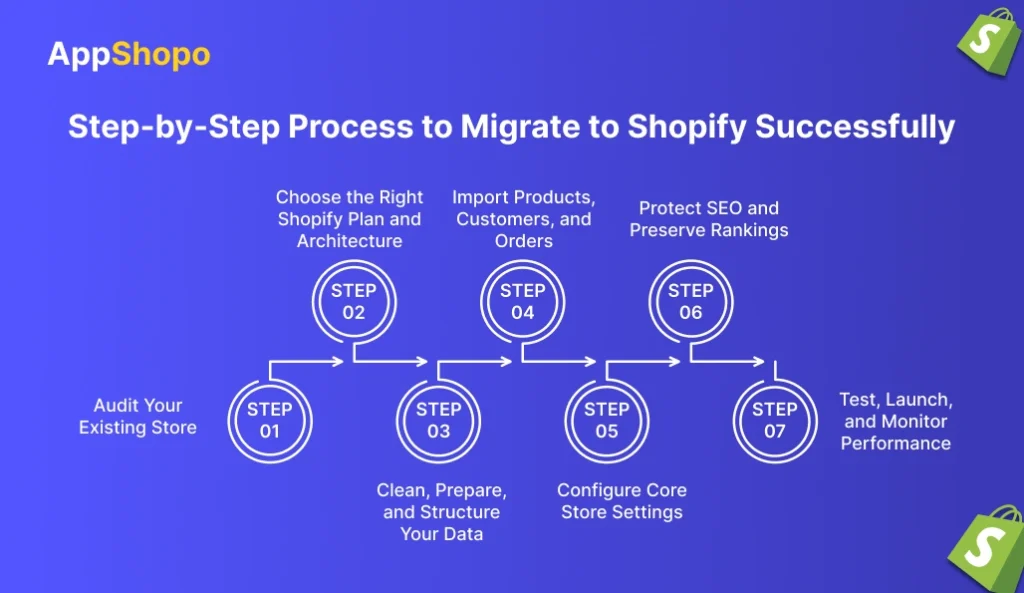
The process of migrating an online store involves multiple tasks beyond the simple transfer of data between different platforms. The structured approach that brands need to use for their Shopify migration protects three critical aspects, which include traffic and data, customer trust, through its planning, testing, and post-launch monitoring framework. The following steps outline a reliable Shopify migration process.
Step 1: Audit Your Existing Store
You should start your Shopify migration process with a complete assessment of your existing eCommerce business. The process aids you in determining which elements to transfer from your system, which elements need enhancement, and which elements must be completely deleted.
You need to start your product catalog assessment by checking all product variants together with their respective pricing information, SKUs, and inventory levels. You need to evaluate all customer accounts together with their past orders, current subscriptions, and all collected customer information. The website needs an evaluation of all content pages, including blogs and FAQs, legal documents, current applications, and outside system connections. The SEO analysis requires the collection of current URLs together with their associated metadata, backlinks, andthe most successful web pages. The complete assessment process protects data through the reduction of migration threats while establishing a precise pathway that ensures successful implementation.
Key audit focus areas:
- Examine all product information, variations, pricing models, and stock levels to guarantee that everything matches up before migration.
- Evaluate customer accounts, orders, and subscription records to find out what types of information are linked together and critical to retention.
- Ensure all of your content pages, blog posts, and legal documents remain relevant after a move by conducting an audit.
- Record any existing apps, plug-ins, or other third-party services to accurately replace them with Shopify counterparts when the move is complete.
- Gather up all current URL addresses, metadata, and backlinks from well-performing SEO pages for setting up redirects properly.
Step 2: Choose the Right Shopify Plan and Architecture
The choice of a plan on Shopify should be undertaken with accuracy, as this decision will affect the manner in which the business will function in the present day—and in all likelihood its method for expanding in the future. The Basic Plan, Shopify Plan, and Advanced Plan each represent a legitimate path for the migration of small and mid-sized enterprises to use Shopify as their eCommerce platform; however, those brands operating at an enterprise level will need to utilize the Shopify Plus plan to be able to accommodate either the number of orders processed and/or the amounts of operational efficiencies created through their processes.
You need to establish your store design before proceeding with this stage. The planning process requires you to establish international selling capabilities, multi-currency support, language requirements, and specific storefronts for different regions. The decisions need to be made at this stage because they will assist your Shopify implementation process to meet your business objectives and help your brand to grow without any operational interruptions.
Planning considerations:
- Evaluate Shopify plans based on transaction volume, customization needs, and operational complexity.
- Determine whether Shopify Plus is required for automation, advanced workflows, and enterprise scalability.
- Plan international selling strategies, including currencies, languages, and localized storefront experiences.
- Define store architecture to support future expansion without major platform restructuring.
Step 3: Clean, Prepare, and Structure Your Data
Data preparation stands as the primary requirement when businesses need to transition their operations to Shopify. You should first assess your existing data before proceeding to transfer your data to Shopify because data quality and consistency need improvement. You should do multiple tasks, which include removing all outdated and duplicate products, establishing standardized SKUs and product attributes, verifying customer records for accuracy, and eliminating all existing mistakes. Your organization needs to determine whether to move all order information or only current, active orders based on your reporting requirements and compliance needs.
The store requires accurate data organization because it improves performance and generates correct reports while simplifying store management through Shopify for extended periods. .
Data preparation tasks:
- We need to clear out any old, duplicate or no longer active products from the new Shopify store to make sure it will be as organized as possible.
- We also need to create a standard convention for SKUs, attributes and naming conventions to ensure we can manage products in a consistent manner and be able to report on them correctly.
- All customer records must be validated to eliminate duplicate and incomplete customer profiles and outdated customer contact information.
- Determine what historical orders are necessary for either analytics, customer service or compliance purposes.
Step 4: Import Products, Customers, and Orders
Once ready to get started importing into Shopify, you will now have all of your products, customers, and orders available by importing them. Depending on how much data there is to import (depending on the store size and complexity), you have three options for importing your data: a CSV upload, through APIs, or through third-party migration tools.
Once all data has been imported, you will need to carefully check each product for price variability, and inventory levels and image files associated with them, as well as all customer profiles and entire order histories contained within them to verify that all items have the correct attributes and that the relations between the different types of data have been maintained. Throughout the process of identifying and resolving any discrepancies before launching your store, you will be able to avoid potential operation issues or customer-facing error logs arising from, for example, incorrect product listings in the eCommerce System when it comes time to launch.
Post-import validation checks:
- Verify product variants, pricing accuracy, inventory quantities, and image associations after data import.
- Review customer profiles to ensure addresses, contact details, and order histories are migrated correctly.
- Validate order records to confirm totals, taxes, and fulfillment statuses remain accurate.
- Identify and correct formatting or mapping errors before proceeding to store configuration.
Step 5: Configure Core Store Settings
It’s important that your essential store settings are configured correctly before you start managing a successful business at your store each day after migrating your information to your new store and preparing the necessary settings. This includes configuring your payment gateways so customers can use them to complete their purchases at checkout (i.e., what options will they have for completing their purchases), establishing shipping zones based on the locations you are shipping to, establishing fulfillment rules for determining what type of shipping options are available for your products, and knowing how much tax will be charged based on the location you ship to.
You will also need to configure the necessary legal and compliance pages, any compliance you need to have according to your jurisdiction, and any policies for your store (such as your return policy, your privacy policy, or your terms & conditions) and make sure everything is set up correctly because this is essential to having a smooth and reliable checkout process for your customers, as well as the ability to process your orders in a timely and reliable manner once your new Shopify store becomes available publicly.
Core configuration areas:
- Set up payment gateways, checkout rules, and customer account preferences to support smooth transactions.
- Configure shipping zones, rates, carriers, and fulfillment rules based on regional delivery requirements.
- Apply correct tax settings according to applicable regions and regulatory obligations.
- Publish store policies, legal pages, and compliance documentation before launching the store.
Step 6: Protect SEO and Preserve Rankings
If you’re switching to the Shopify platform, Search Engine Optimization (SEO) is critical for maintaining your organic performance. If you don’t have an effective SEO migration strategy in place, you risk losing significant amounts of traffic and rankings.
A proper SEO migration project includes a full URL mapping document, 301 redirecting old URLs from your old site(s) to your new Shopify URLs, migrating all existing meta titles, meta descriptions, page headings, and structured content, updating all internal links, and submitting a new XML sitemap for your new Shopify store to search engines. Completing a proper SEO migration project will allow you to retain your ranks, backlinks, and organic traffic after launch.
SEO migration actions:
- Map all existing URLs to corresponding Shopify URLs to prevent broken links.
- Implement 301 redirects to transfer SEO authority from old pages to new ones.
- Migrate metadata, headings, and structured content to maintain keyword relevance.
- Submit updated XML sitemaps and monitor search engine indexing post-launch.
Step 7: Test, Launch, and Monitor Performance
Before making your Shopify store live, extensively test all devices, all browsers, the ability to browse products, the ability to search for products, how a customer adds items into their cart, how customers check out, how customers pay, what they pay in taxes, and how much they will be charged for shipping.
Once your testing is complete, launch your store by updating your DNS settings and removing the password protection. After launching your store, closely monitor all traffic, conversion rates, error logs, and SEO performance over the first several weeks. Constant monitoring will give you the ability to ensure that your store will remain stable, to address any issues quickly, and to provide a positive shopping experience to your customers.
Launch and monitoring checklist:
- Test browsing, search, cart, and checkout workflows across devices and browsers thoroughly.
- Validate payment processing, shipping calculations, and tax accuracy before going live.
- Update DNS settings and remove the storefront password to complete the store launch.
- Monitor traffic, conversions, errors, and SEO performance closely after launch.
Common Shopify Migration Challenges and How to Avoid Them
Even with a well-structured plan, eCommerce brands can encounter challenges when they migrate to Shopify. Identifying these risks early allows businesses to take preventive measures, avoid costly disruptions, and ensure a smoother transition to the new platform.
Key challenges to watch for:
- Loss of organic traffic due to SEO mismanagement: Missing redirects or improperly migrated metadata can cause search engines to drop existing rankings. Creating a detailed URL mapping plan and implementing 301 redirects before launch helps preserve SEO performance.
- Data inconsistencies during migration: Incorrect field mapping can lead to missing product attributes, broken variants, or incomplete customer and order records. Thorough data validation and post-import checks ensure accuracy across all migrated data.
- Checkout and payment configuration issues: Misconfigured payment gateways, tax rules, or shipping settings can disrupt checkout and negatively impact conversions. Testing the complete checkout flow before launch helps prevent revenue loss.
- Missing or incompatible functionality: Some features from legacy platforms may not have direct Shopify equivalents. Auditing existing apps and identifying suitable Shopify integrations in advance prevents functional gaps after migration.
- Performance and site speed issues: Unoptimized themes, oversized images, or excessive third-party scripts can slow down the store. Optimizing assets and limiting unnecessary integrations improves performance and user experience.
By proactively addressing these challenges through careful planning, extensive testing, and ongoing validation, eCommerce brands can significantly reduce migration risks and maintain operational stability throughout the transition.
Best Practices for a Successful Shopify Migration
Following proven best practices ensures that your decision to migrate to Shopify delivers long-term value and measurable results. These practices help maintain operational stability, protect performance, and preserve customer trust throughout the migration process.
Recommended best practices:
- Create a detailed migration checklist before execution: A comprehensive checklist helps track every critical task, including data migration, SEO protection, app integrations, and testing. This ensures nothing is missed and keeps the migration process organized and predictable.
- Perform the migration in a staging environment: Using a staging or development environment allows you to test changes without affecting live customers. This approach helps identify data issues, design problems, and functional errors before the final launch.
- Prioritize SEO preservation from the beginning: Mapping existing URLs and implementing 301 redirects early prevents broken links and ranking losses. Migrating metadata and submitting updated sitemaps further supports search engine visibility after launch.
- Test extensively across devices, browsers, and user journeys: Thorough testing ensures that browsing, checkout, payments, and shipping work seamlessly across different devices and browsers. Testing real customer journeys helps identify issues that automated tests may miss.
- Monitor performance closely after launch: The first few weeks after launch are critical. Tracking traffic, conversions, site speed, and error logs allows teams to quickly resolve issues and maintain a stable shopping experience.
Applying these best practices helps ensure a smooth Shopify migration while minimizing downtime, reducing revenue risks, and delivering a consistent experience for customers throughout the transition.
Conclusion
Choosing to migrate to Shopify is more than a platform upgrade—it is a strategic investment in the long-term success of your eCommerce brand. When executed with careful planning, clean and structured data, strong SEO safeguards, and thorough testing, a Shopify migration can significantly enhance site performance, scalability, and overall customer experience.
Following a step-by-step migration approach helps minimize risks, protect organic traffic, and ensure operational continuity throughout the transition. More importantly, it creates a flexible and future-ready foundation that supports growth, innovation, and evolving customer expectations.
For brands looking to migrate to Shopify with confidence, partnering with an experienced Shopify development team can make a measurable difference. Appshopo specializes in Shopify and Shopify Plus migrations, helping eCommerce businesses move from legacy platforms to Shopify without data loss, SEO disruption, or downtime. With a focus on performance, scalability, and business outcomes, Appshopo ensures a smooth migration process tailored to your brand’s specific needs.
Whether you are planning a simple store move or a complex enterprise-level migration, the right strategy and the right partner can turn your Shopify migration into a long-term growth advantage.
FAQs
1. How long does it take to migrate to Shopify?
The duration needed for Shopify migration work depends on three factors, which include the size of the store, the complexity of its data, and its existing systems. Small stores need one to two weeks for their migrations, whereas enterprises require several weeks to complete their migration process. The combination of proper planning, data cleanup operations and testing procedures creates a process that reduces delays and provides a seamless migration process.
2. Will I lose SEO rankings when I migrate to Shopify?
You will maintain your SEO rankings after you migrate to Shopify if you execute the migration process properly. The implementation of 301 redirects, together with the migration of metadata, the preservation of URL structures, and the submission of updated sitemaps, enables organizations to maintain their online search presence. The main reason why websites lose their search engine rankings during site changes is that their SEO strategies have not been properly developed.
3. Can I migrate customer data and order history to Shopify?
Businesses need to transfer their customer database, together with their address records and order history,y through CSV files or migration software. The system requires customers to reset their passwords because the migration process cannot transfer sensitive data, which includes passwords.
4. Is Shopify suitable for large or enterprise eCommerce businesses?
Shopify Plus, together with the base Shopify functions, it acts as an effective solution for both large companies and enterprise operations. Brands choose Shopify as their platform because it provides them with scalable operations, high system availability, automated functions, and international sales capabilities. The Shopify Plus platform enables expanding businesses to handle extensive order processing, as well as create personalized operational procedures and develop advanced system connections.
5. Should I use a Shopify migration expert or do it myself?
Small stores can manage basic migrations by themselves, but most brands need to work with Shopify migration specialists. The professionals assist you in Shopify migration by preventing data loss, SEO problems, and operational interruptions. The expert guidance helps organizations complete their projects faster while reducing mistakes and increasing their performance after launch.

Pankaj Arora
Founder, AppShopo

Pankaj Arora is a technology entrepreneur and the Founder of AppShopo, with over 10 years of experience in helping businesses transform websites into high-performing mobile apps. His expertise spans eCommerce app development, Shopify and WooCommerce integrations, mobile UX optimization, and scalable app delivery. Through AppShopo, Pankaj has enabled brands worldwide to launch fast, reliable Android and iOS apps that drive higher engagement, retention, and mobile sales.