Website into an App: A Step-by-Step Guide to Converting Your Website into a Mobile App
The digital ecosystem has progressed to a point where the mobile user interface is the main platform and the users’ wants and needs are dictated by the mobile applications they use. Speed, ease, customization, and frictionless communication have all become necessities. While the responsive website was a tool to unite desktop and mobile usage, it is now losing the battle against native mobile applications in terms of both performance and engagement.
The increase in mobile usage and its takeover of global internet traffic has made the website-only approach very limiting. In fact, this transition has turned the conversion of a website into a mobile app from a technical upgrade to a strategic business decision. Mobile apps facilitate faster load times, smoother navigation, personalized experiences, and more direct communication than mobile browsers.
Mobile apps have become the backbone of customer retention and long-term growth strategies for ecommerce brands, SaaS platforms, service, and content publishers. Instead of being just another distribution channel, an app enhances a brand’s online presence and customer interaction while also boosting customer lifetime value.
As per Wikipedia’s operating system usage data, Android and iOS together control nearly 100% of the global mobile operating system market, making mobile apps a universal and scalable access channel for businesses.
This blog post presents the conversion of a website into a mobile app in five steps; it is also pointing out the implications of the process, the right way to go about it, and the considerations to be made throughout the journey. The whole experience and best practices shared are based on our team’s practical experience and real-world application in several sectors.
TL;DR
- Mobile apps outperform websites in speed and usability
- The use of applications has a great impact on customer engagement and retention.
- By push notifications, a direct and real-time communication channel is created.
- Apps lead to better conversion rates as a result of user journeys being made easier.
- Website-to-app conversion supports long-term business growth
Key Points
- Mobile applications provide quicker loading times and more fluid interactions in comparison to mobile websites for every user interaction.
- Transforming a website into an app enhances repeat usage, customer loyalty, and overall lifetime value.
- Push notifications make it possible for companies to communicate urgently without depending on paid advertising or email open rates.
- Applications make the navigation and checkout process less complicated, thus resulting in more sales and happier users.
- Website-to-app conversion lets companies implement digital strategies that are scalable and future-ready.
Why Businesses Should Convert Their Website into a Mobile App
In the current online world dominated by mobile, changing a website into a mobile app has turned into the main choice that is required strategically, not merely as an optional upgrade. Users have now become very demanding and want the mobile app-like experience of speed, seamlessness, and personalization. Mobile applications have become a huge advantage for companies over mobile sites when it comes to performance, user interaction, and customer engagement. The use of localized device features in apps is one of the ways that businesses are enabled to keep customers, enhance sales, and create durable relationships that lead to constant growth and measurable impact on the business.
Key Reasons to Convert Your Website into a Mobile App
- Faster loading times along with dependable performance, which were made mobile device and various network condition friendly.
- The mobility user experience is made better by using native gestures, smooth navigation, and intuitive interactions.
- Customer engagement and repeat usage are increased by the app’s constant presence on users’ devices.
- Direct and immediate interactions with users via push notifications; no need for paying channels.
- Higher conversion rates by reducing friction in crucial actions such as signup, booking, and buying.
- Increased brand recognition and loyalty, which are supported by personalized treatment and app-only features.
Also Read: Best Website to App Conversion Tools
Step-by-Step Guide to Converting Your Website into a Mobile App
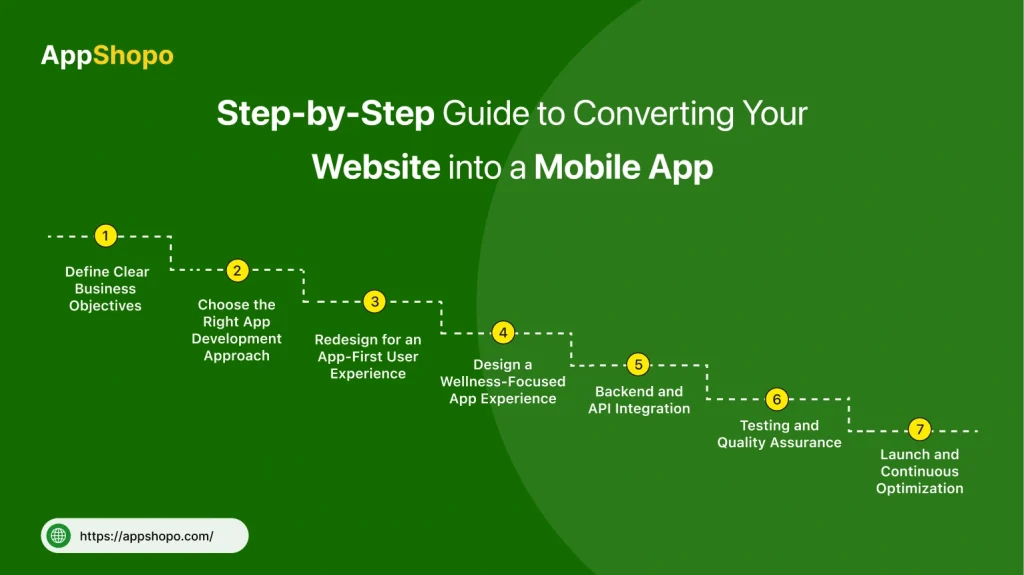
A successful website-to-mobile-app conversion is a process that involves much more than simply putting the website into an app container. It is a careful, planned, and continuous process that ensures the app will bring significant business value, great performance, and excellent user experience as a result of using social media.
Step 1: Define Clear Business Objectives
It is very important to openly say what your mobile app should do before even the development phase starts. Business targets give guidance through design, functionality, and technology decisions. No matter if the priority is keeping customers, making them interact, or selling to them, unambiguous aims make sure that the app is in line with the measurable outcomes of the business.
Key Focus Areas:
- Customer retention and repeat usage
- Performance and speed improvements
- Push notification and engagement strategy
- Revenue or conversion goals
- Long-term scalability and growth
Step 2: Choose the Right App Development Approach
The performance, cost, and scaling capabilities are directly affected by the selection of the appropriate development method. Companies could go for the WebView applications, Progressive Web Apps (PWAs), or native and hybrid ones. Every choice has its own merits and demerits, but the businesses focusing on growth usually give precedence to the performance and flexibility.
Available Approaches:
- WebView apps for quick and low-cost launches
- Progressive Web Apps for browser-based app experiences
- Native apps for platform-specific performance
- Hybrid apps for cross-platform efficiency
- Scalable architecture for future enhancements
Step 3: Redesign for an App-First User Experience
A mobile application necessitates a user experience that is tailored to mobile devices specifically. Just putting website layouts into another form can result in a bad user experience. The design that is primarily for the app emphasizes simplicity, intuitive navigation, and touch-friendly interactions that minimize friction and create more engagement.
UX Design Priorities:
- Simplified navigation structures
- Thumb-friendly buttons and gestures
- Minimal input and fewer steps
- Clear visual hierarchy
- Consistent and intuitive user flows
Step 4: Backend and API Integration
A reliable and robust backend is a necessity for a flawless application user experience. APIs that are secure and scalable make it possible for the website and the mobile app to have their data synchronized in real-time. Adequate backend integration fortifies performance, reliability, and uniformity in functionality over different platforms.
Technical Considerations:
- Secure API connections
- Real-time data synchronization
- User authentication and session management
- Scalable server infrastructure
- Data consistency across platforms
Step 5: Add App-Specific Features
In order to provide actual value, a mobile application must bring more than the site. Specific features for apps increase interaction and keep users by using device potentials and individualization. Such features are of great help in making the application stand out from the mobile web experience.
High-Impact Features:
- Push notifications for real-time communication
- Offline access to key content
- Saved user preferences and profiles
- Personalized content and recommendations
- Device feature integrations
Step 6: Testing and Quality Assurance
Systematic examination assures that the application can be trusted to perform correctly everywhere, that is, on all kinds of devices and operating systems. Checking helps report errors, problems with user-friendliness, and slow points concerning performance, which in turn means the risk of adverse user experiences is minimized since the reported issues are addressed before the product goes live.
Testing Areas:
- Functional testing across features
- Performance and load testing
- UI and UX validation
- Security and data protection checks
- Cross-device and OS compatibility
Step 7: Launch and Continuous Optimization
The launching of the app is just the initial step. Continuous optimization is a must to ensure the app still gets the attention, remains a competitor, and stays in line with what the users want. Paying attention to performance and user activity allows for making gradual improvements based on data.
Post-Launch Activities:
- App store submission and optimization
- User behavior and analytics tracking
- Feedback collection and analysis
- Regular updates and feature enhancements
- Performance and security improvements
According to Wikipedia, mobile devices now account for the majority of global internet usage, with mobile applications driving higher engagement than mobile websites—making a structured website-to-app conversion strategy essential.
Key Factors to Consider Before Converting Your Website into a Mobile App
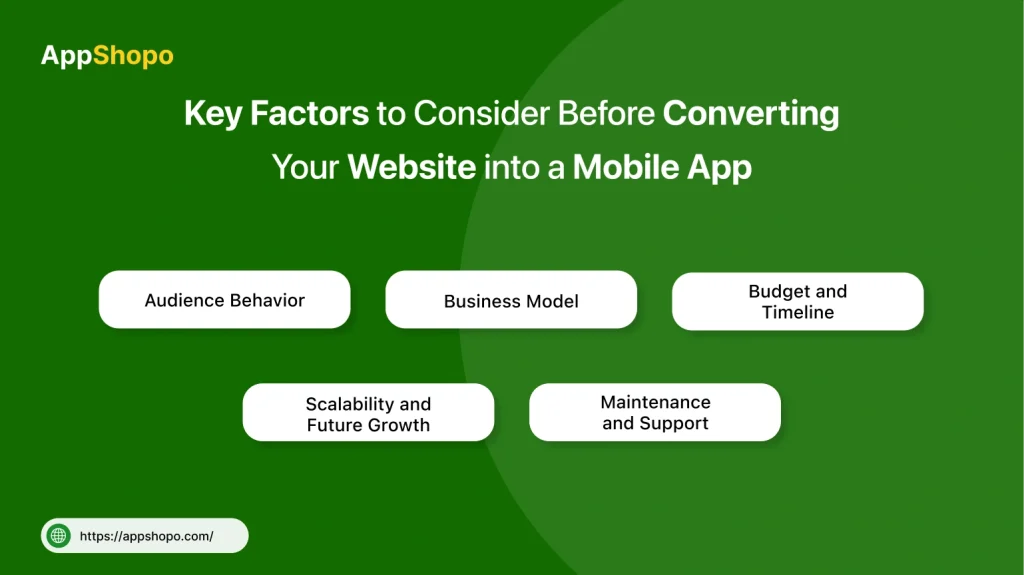
Companies that are planning to transform a website into a mobile application need to scrutinize thoroughly the strategic and operational factors that want to be considered carefully. A business-oriented appraisal not only identifies the real value of the app, but it also matches the app with the company’s objectives and is a tool for long-term growth rather than letting it become a no-use asset.
1. Audience Behavior
It is vital to know the behavior of users on your platform. A mobile application might make a great contribution to user interaction, accessibility, and even user retention if a big part of your traffic is from mobile phones. The value of apps is even more when users come back often or take a long time on the platform.
2. Business Model
Mobile applications have the greatest effect on companies that need to do repetitive interactions. Apps provide e-commerce, subscription, SaaS, and content-based businesses with improvement in retention, slow access, and user experiences that are tailored to the needs of the users.
3. Budget and Timeline
To create a mobile application, there is a need of an initial investment and to maintain it throughout its lifespan, there would be need to upgrade, maintain and optimize the app regularly. Rather than giving the most priority to the initial costs, businesses should quantify the long-term ROI considering elements like customer lifetime value and retention gains.
4. Scalability and Future Growth
Mobile app should be designed not only for present use but also for future expansion. This means adding new features, connections with third-party applications, and the ability to handle a larger number of users without affecting the performance or the experience of the users.
5. Maintenance and Support
Mobile applications demand continuous monitoring and updating as per changes in the operating system, security standards, and user expectations. A proper maintenance plan will keep the app vibrant, secure, and current for years.
By taking these factors into account carefully, you will be sure that transforming your website into a mobile app is the right decision for you, a decision that is not only aligned with your business objectives but also with the digital roadmap of your company in the long run.
Avoiding Common Mistakes When Converting a Website into a Mobile App
Many companies fail to achieve the desired results that are expected from converting their website into a mobile app, and the reason for this is that they have made the very common mistakes that could have been easily avoided. The issues associated with this situation are typically bad planning, not refining the performance, neglecting to make a good user experience the priority, not considering the requirements of the platform, and so on. To expertly evade these traps, a strategic approach is required. This will allow for the performance to come first, the user to be the focus of the design, the regulations to be followed, and the system to be able to improve indefinitely. Companies could, then, through good planning and with the aim of getting the most out of the performance, turn their mobile apps into the reservoir of long-term value, high user acceptance, and growth that will continue.
- Considering the App as a Wrapped Website: Just putting a website into an app format without altering the user experience leads to a situation where performance is slow, navigation is poor, native capabilities are nonexistent, users are annoyed, and finally there is no engagement over the long period.
- Neglecting Performance Optimization: If no optimization is done for speed, responsiveness, caching, and offline access, it results in longer load times, high bounce rates, negative reviews, and lack of trust among users regardless of the devices and networks.
- Disregarding App Store Guidelines: If the app store regulations are simply ignored or not followed regarding design, and this has been a case before, it will not only lead to the app approval process taking longer than expected but even to rejection. Thus, this scenario will translate into reworking costs becoming higher, which means global launches on the major platforms might be delayed even more.
- Forgetting About Analytics and User Feedback: A business that does not rely on analytics and user feedback will be unable to detect where users are having problems with using the app and won’t be able to measure the success or rate the importance of areas for development, as well as to make their decisions based on data, which can help in both retention and lifetime value to be increased.
- Treating the App as a One-Time Project: The one-time launch strategy of the application completely neglects the updates, user expectations, OS modifications, security requirements, and optimization, causing the app to lose its relevance, suffer from performance issues, and experience a drop in user engagement.
Conclusion
Translating a website into a mobile application is amongst the most influential digital decisions a company can take at present. Even though websites are still very important for being found and for SEO purposes, mobile apps are the ones that bring engagement, performance, and eventually, customer loyalty for the long term.
The procedure of successfully converting a website to an application is going through strategic planning, user-centered design, scalable technology, and continuous optimization. When the process is done right, the mobile app turns into a strong growth engine instead of just another digital channel.
AppShopo assists customers in a stress-free way to change their websites into very active mobile applications designed for speed, engagement, and scalability. Through its profound knowledge and a results-oriented method, AppShopo makes it possible for brands to come up with their products quicker, keep their customers longer, and have a fair fight in a mobile-first world.
If you’re thinking of bringing your website into the arena of mobile applications that produce actual business returns, then AppShopo is the trustworthy partner for you.
FAQs
1. Is it possible to convert any website into a mobile application?
Most of the websites can be turned into a mobile application; nevertheless, the quality and the performance of the app rely on the backend architecture, data structure, and functionality of the website. Websites that have good APIs, scalable infrastructure, and modern frameworks are easier to transform and provide better app performance in the long run.
2. Website to app conversion process takes how long?
The duration of a website-to-mobile-app conversion is determined by its complexity, features, and development strategy. Quick-to-market apps could be ready in a few weeks, whereas corporate-level apps taking several months—designing, developing, testing, and getting app store approvals included—would be feature-rich or of high complexity.
3. Is it very costly to turn a website into an app?
The price for converting a website to a mobile app varies according to the design needs, features, and technology options. Developing native apps requires higher initial investment but they also provide better performance, scalability, and user experience, thus making them stronger in terms of investment return that is long-term and for the growth of businesses.
4. Will the application be compatible with both iOS and Android?
Certainly, today’s cross-platform and hybrid development techniques can make a single application perform very well on both iOS and Android. This method cuts down on the time and cost of development while ensuring that the functionalities, performance, and user experience are the same across the different devices and operating systems.
5. Is there still a need for a website after an app is launched?
Absolutely, a website is still very important even when a mobile app is already launched. Websites are very important in the areas of search engine visibility, content discovery, and new user acquisition, while mobile apps are focused on engagement, retention, and providing personalized experiences to current users.

Pankaj Arora
Founder, AppShopo

Pankaj Arora is a technology entrepreneur and the Founder of AppShopo, with over 10 years of experience in helping businesses transform websites into high-performing mobile apps. His expertise spans eCommerce app development, Shopify and WooCommerce integrations, mobile UX optimization, and scalable app delivery. Through AppShopo, Pankaj has enabled brands worldwide to launch fast, reliable Android and iOS apps that drive higher engagement, retention, and mobile sales.